Operational Security on Torzon Darknet
A comprehensive research guide to OPSEC practices, tools, threat models, and red flags for anyone researching darknet marketplace security. All content is informational and educational.
Why Do You Need to Think About OPSEC?
Operational security (OPSEC) originated as a military intelligence framework — the process of identifying and protecting information that adversaries could use to cause harm. Applied to darknet access, OPSEC means systematically eliminating the data points that could link your online activity to your real-world identity.
The Torzon darknet platform, like all onion services, provides network-layer anonymity through Tor. However, Tor does not protect against: browser fingerprinting, metadata leakage, operational mistakes, behavioral pattern analysis, or physical security failures. The majority of documented law enforcement actions against darknet users exploited OPSEC failures — not Tor vulnerabilities.
"In virtually every significant darknet case, the arrest followed from operational security mistakes, not from breaking Tor encryption." — Paraphrased from multiple documented case analyses, 2013–2025.
What Helps You Remain Anonymous?
Effective anonymity on the darknet is not a single tool — it is a layered system where each layer compensates for weaknesses in others. The following tools and practices form the documented foundation of darknet OPSEC:
Tools for Remaining Anonymous
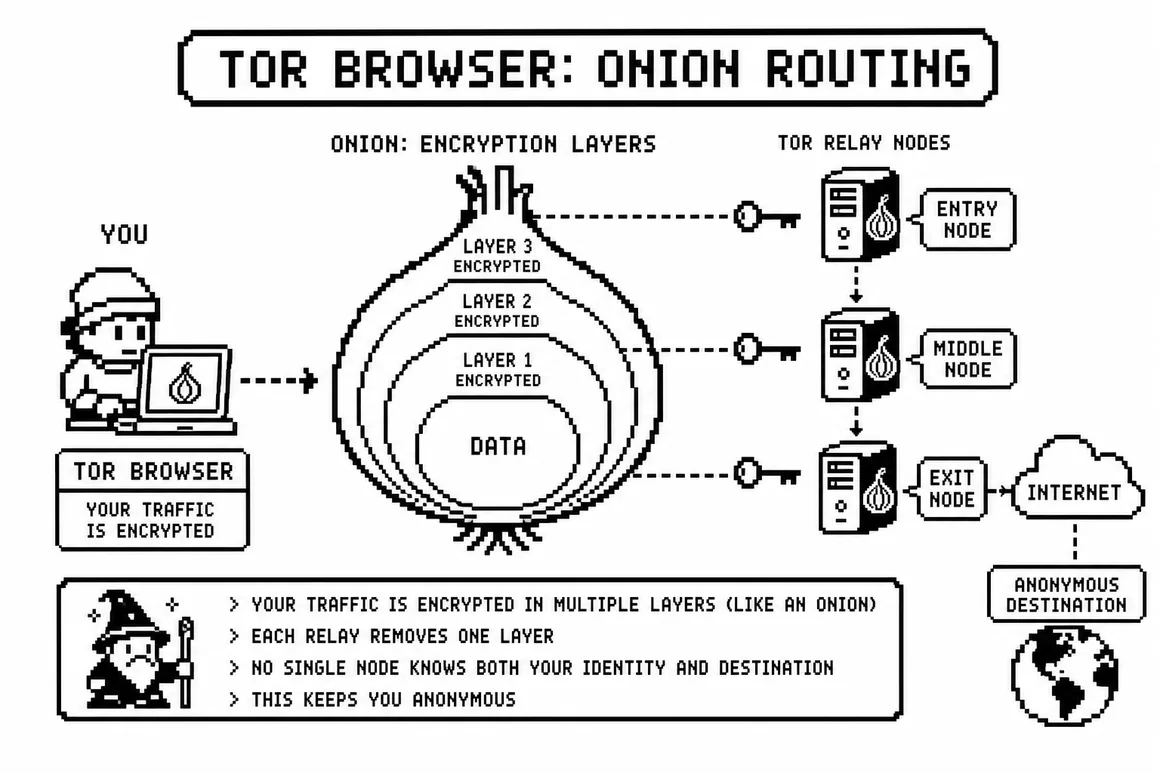
The Tor Anonymity Model
Traffic wrapped in three encryption layers. Each relay decrypts only the layer it needs. No single node knows both your identity and destination. Entry node knows you — not where you're going. Exit node knows destination — not who you are.
Layer 1 — The Tor Browser
The official Tor Browser is a modified Firefox with specific anti-fingerprinting measures, HTTPS enforcement, and circuit isolation per domain. It is the minimum requirement for darknet access.
- Download exclusively from torproject.org — verify signature
- Set security level to Safest (disables JavaScript)
- Never install additional extensions — they break fingerprint uniformity
- Never maximize the browser window — screen size is a fingerprint vector
- Restart Tor Browser between sessions for a new circuit
Layer 2 — Tails OS
Tails (The Amnesic Incognito Live System) is a Debian-based operating system designed to boot from USB and leave zero persistent data on the host machine.
- Download from tails.boum.org — verify PGP signature
- Run from a dedicated USB — never install on hard drive
- All traffic routes through Tor automatically
- RAM wiped on shutdown — no traces left behind
- Persistent encrypted storage available for keys/notes if needed
Layer 3 — Monero (XMR)
Financial transactions are a primary deanonymization vector. Bitcoin, despite its perceived anonymity, has a fully transparent blockchain. Law enforcement and private analytics firms (Chainalysis, CipherTrace) routinely trace BTC flows.
- Monero hides sender, receiver, and amount by default
- Ring signatures obscure the true input among decoys
- Stealth addresses prevent address reuse tracking
- RingCT hides transaction amounts from public view
- Never exchange XMR for BTC — this creates a linkage point
XMR Resource
For detailed XMR acquisition and usage guidance, see the Monero Privacy Guide. For on-ramp methods that minimize identity linkage, see the detailed purchasing section.
Layer 4 — PGP Encryption
PGP (OpenPGP standard, RFC 4880) provides end-to-end encryption for text communications. Even if a darknet server is seized, properly PGP-encrypted messages are computationally unreadable without the recipient's private key.
- Generate a dedicated keypair — never reuse from other contexts
- Use 4096-bit RSA or Ed25519 keys
- Set an expiry date — dead keys accumulate and confuse
- Protect private key with a strong passphrase
- Software: GPG4Win (Win), GPG Suite (macOS), GnuPG (Linux)
- Never upload private key — only the public key goes on the platform
Red Flags: What to Avoid
The following behaviors and situations are documented risk factors associated with deanonymization. This list is compiled from public case analyses and security research literature.
Operational Red Flags
- Accessing .onion sites in any browser other than Tor Browser or Tails
- Using the same username, password pattern, or writing style across platforms
- Discussing darknet activities on any clearnet platform (Reddit, Telegram, Discord)
- Shipping controlled substances to your home address or real name
- Using the same PGP key across multiple market identities
- Logging into personal accounts (email, social media) while Tor Browser is open
- Disabling Tor Browser's anti-fingerprinting measures ("just for this one site")
Financial Red Flags
- Purchasing Bitcoin directly from a KYC exchange and sending to market wallet
- Converting BTC to market funds without mixing — creates direct chain link
- Using the same wallet address more than once (BTC address reuse)
- Withdrawing market funds directly to a personal exchange account
- Conducting unusually large transactions that trigger blockchain analytics flags
Phishing Red Flags
- Any onion URL received via unsolicited message — even from "known contacts"
- Market "support" initiating contact to offer help you didn't request
- URLs that visually resemble Torzon addresses but differ by one character
- Login pages that don't present a PGP 2FA challenge
- Vendors requesting communication on Telegram, Signal, or outside the platform
The most catastrophic OPSEC failure is combining multiple small leaks. Each individual mistake may seem minor — but correlation of usernames, writing style, transaction patterns, and physical shipping addresses creates an identifiable profile. Think adversarially: assume a sophisticated actor is correlating everything.
Documented Common Mistakes
The following patterns appear repeatedly in publicly documented law enforcement actions against darknet users (compiled from court documents and news sources, 2013–2025):
| Mistake Category | Description | Risk Level |
|---|---|---|
| Username Reuse | Same handle used on darknet markets and clearnet forums | CRITICAL |
| Bitcoin Tracing | KYC-purchased BTC sent directly to market without mixing | CRITICAL |
| Home Delivery | Packages shipped to real address with real name | CRITICAL |
| Clearnet Chatter | Market activity discussed on Reddit, Telegram, social media | HIGH |
| Key Reuse | PGP key used across multiple platforms and markets | HIGH |
| Vendor Images | Product photos containing metadata or identifiable locations | HIGH |
| Writing Style | Unique writing patterns linked across anonymous and real accounts | MEDIUM |
| Browser Fingerprint | Custom Tor Browser configurations create unique signatures | MEDIUM |
External OPSEC Resources
The following reputable resources provide additional depth on operational security topics referenced in this guide:
- EFF: Why You Should Use Tor Browser — Electronic Frontier Foundation
- EFF Surveillance Self-Defense (ssd.eff.org) — Comprehensive privacy guide
- Tor Project Official Download — torproject.org
- Tails OS Official Site — tails.boum.org
- GnuPG Documentation — gnupg.org
- Privacy Guides — Community-maintained privacy tool recommendations
Tor Browser provides network-layer anonymity but does not protect against all threats. For higher-risk use cases, Tails OS booted from USB is the recommended baseline. Tor Browser alone is vulnerable to: user mistakes (logging into personal accounts), browser exploits, and behavioral fingerprinting if settings are modified from defaults.
The security research community is divided on VPN+Tor configurations. A VPN before Tor (VPN→Tor) hides Tor usage from your ISP but introduces the VPN provider as a trusted third party. A VPN after Tor (Tor→VPN) is rarely recommended. For most threat models, Tor Browser alone is sufficient. Tails OS with Tor is the recommended high-security baseline.
Install GnuPG for your platform. On Linux/macOS: run gpg --full-generate-key. Choose RSA and RSA, 4096 bits, with an appropriate expiry. Use a pseudonymous UID with no real name or email. Protect with a strong passphrase. Export your public key with gpg --armor --export [keyid] and upload this (not your private key) to the market profile.